APRS and GPS
Your WPSD device can put your station on APRS maps: each mode’s gateway sends a beacon with your position and a short description to APRS-IS, the Internet side of APRS. With a GPS receiver plugged in, the beacons follow you as you move.
Turning APRS on
APRS has its own page, Radio > APRS. Turn it on with the switch next to the title, then Apply.
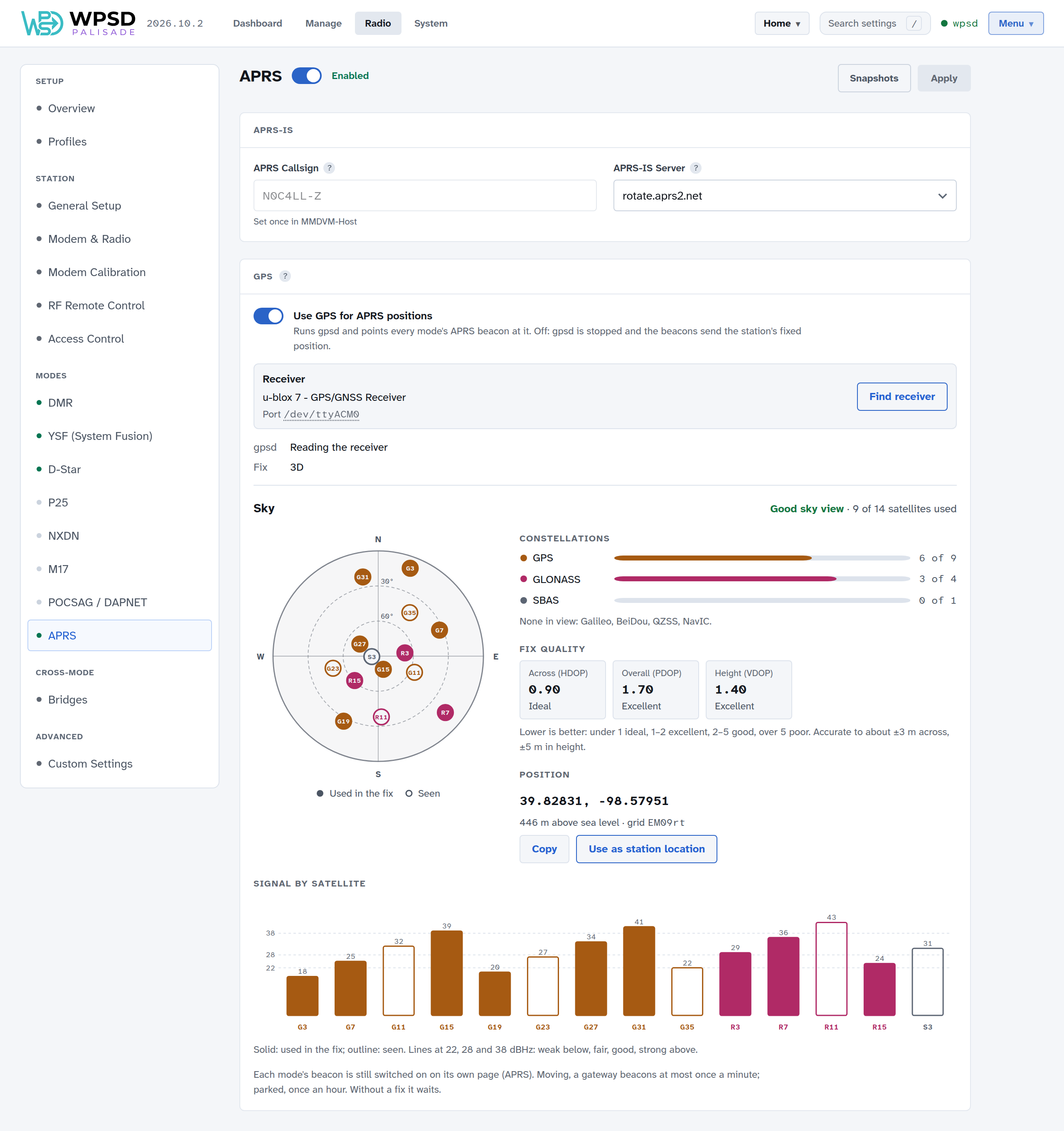
APRS Callsign: the callsign your WPSD device logs in to APRS-IS with. Your APRS-IS passcode is worked out from it and set for you.
APRS-IS Server: rotate.aprs2.net, the public APRS-IS rotation, suits nearly everyone.
Each mode’s beacon
Each mode sends its own beacon, switched on in that mode’s page (APRS section on Radio > DMR, YSF, D-Star, P25, NXDN and M17):
Send APRS beacons: on or off for that mode.
APRS SSID: what follows your callsign in that mode’s beacon (N0C4LL-D for DMR, for example): one or two letters or digits, different for each mode so each shows on the maps as its own station. WPSD Palisade refuses an SSID another station on your WPSD device already uses. D-Star beacons use your D-Star module’s letter.
APRS description: the text after the mode and frequency, up to 40 characters.
APRS symbol: the icon your beacon shows on APRS maps. Choose symbol shows them all; symbols from the alternate table can carry an overlay, a letter or digit drawn on top.
With DG-ID routing on, YSF has two beacons, YSF Gateway’s and DG-ID routing’s, each with its own SSID.
The dashboard’s Modes & Networks panel shows which modes are beaconing and the APRS-IS server your WPSD device is on.
Your position
Without GPS, every beacon sends your station’s fixed position: the latitude and longitude in Station. Set them to 0,0 to leave your location out.
GPS
Plug a USB GPS receiver into your WPSD device, then in the GPS section of Radio > APRS:
Turn on Use GPS for APRS positions.
Choose Find receiver: WPSD Palisade listens on each USB port for a GPS receiver and names the one it finds (it never writes to your modem’s or display’s port).
Apply.
The Receiver box names your receiver and the port it’s on. gpsd (the program that reads it) and Fix (2D or 3D once it knows where it is) show its state.
Sky
Once the receiver has a fix, Sky shows what it sees:
The sky view: each satellite where it is in the sky (north at the top, the horizon at the edge); filled are used in the fix, outlined only seen.
Constellations: how many satellites of each system (GPS, GLONASS, Galileo, BeiDou and others) are used and seen.
Fix quality: HDOP (across), PDOP (overall) and VDOP (height). Lower is better: under 1 ideal, 1–2 excellent, 2–5 good, over 5 poor.
Position: your latitude, longitude, height above sea level and grid square. Copy copies it; Use as station location puts the latitude and longitude into your station settings (not the height: that setting is your antenna’s height above ground).
Signal by satellite: each satellite’s signal strength.
With GPS on, a beacon goes out when you’ve moved, at most once a minute, and once an hour while you’re parked. Without a fix, it waits. Each mode’s beacon is still switched on and off on its own page.