Device Reset
System > Device Reset puts your WPSD device back to a known state: give up ownership, start the radio settings over, or erase everything back to how the image shipped. Before anything happens, it shows exactly what goes and what stays.
Before you reset, think about something smaller: a snapshot undoes a change that didn’t work out, a profile brings back a setup, and Custom Settings can all be turned off at once.
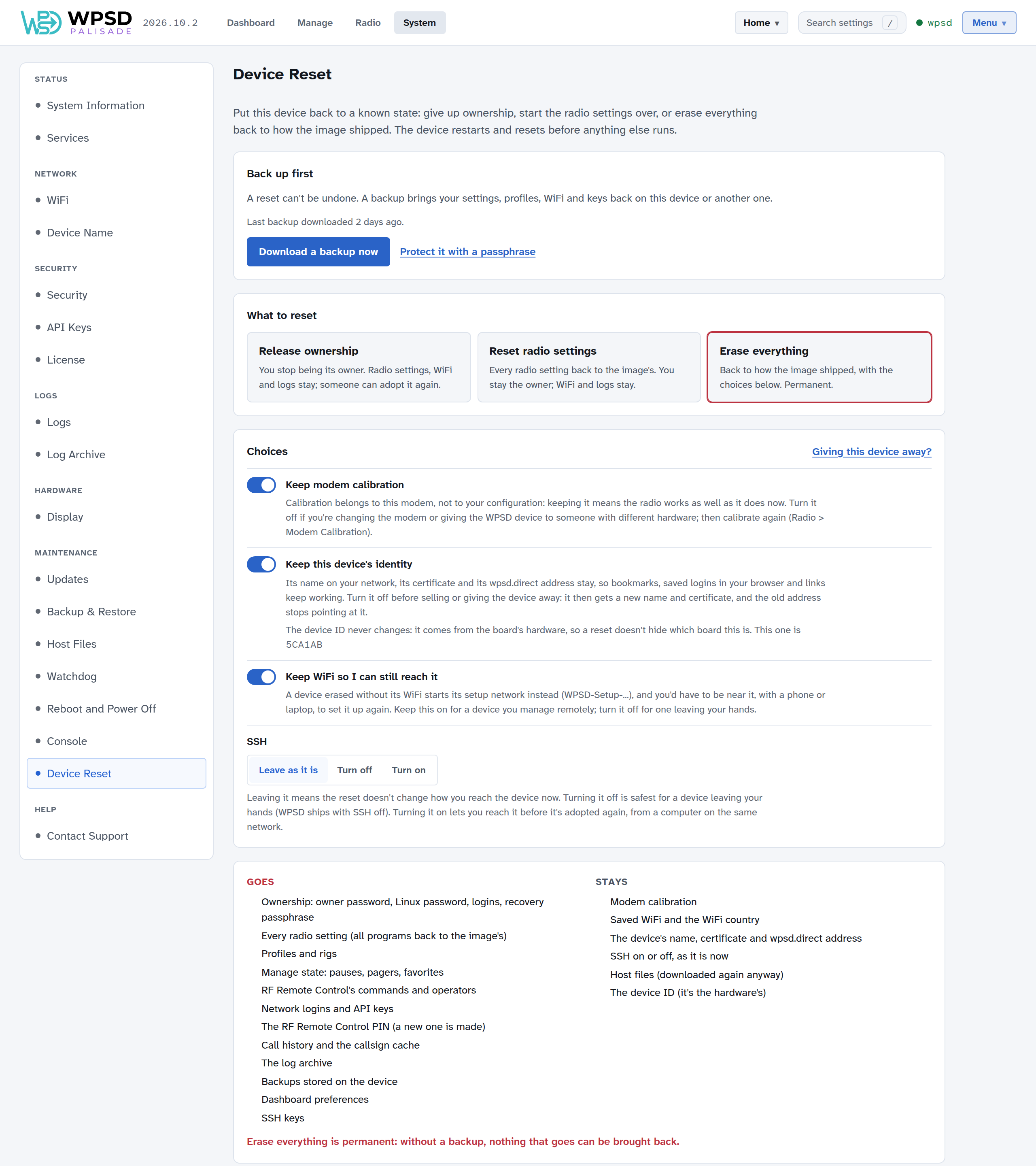
Back up first
A reset can’t be undone. The page says when you last downloaded a backup; Download a backup now makes one (see Backup and Restore). A backup brings your settings, profiles, Wi-Fi and keys back, on this WPSD device or another one.
The three levels
Level |
What goes |
What stays |
|---|---|---|
Release ownership |
You as the owner: the owner password, the password for SSH and the Console, logins on every browser, and the recovery passphrase |
Everything else: radio settings, Wi-Fi, logs, SSH keys, the device’s name |
Reset radio settings |
Every radio setting (all programs back to the image’s), profiles and radios, Manage’s pauses and favorites, RF Remote Control’s commands, network logins and API keys; calibration if you choose |
You as the owner, Wi-Fi, call history, preferences, the device’s name, SSH keys, the RF Remote Control PIN; calibration if you keep it |
Erase everything |
All of the above, and ownership, call history, the log archive, backups stored on the WPSD device, preferences, SSH keys (a new RF Remote Control PIN is made); calibration, identity and Wi-Fi if you choose |
Whatever you choose to keep, the host files (downloaded again anyway) and the device ID |
After Release ownership, the WPSD device can be adopted again, by you or someone else (see First Boot). It’s what the wpsd-reset file does when you forget your password.
Choices
For Reset radio settings and Erase everything:
Keep modem calibration: calibration belongs to the modem, not to your settings, so keeping it means the radio works as well as it does now. Turn it off if you’re changing the modem, or giving the WPSD device to someone with different hardware; then calibrate again.
For Erase everything:
Keep this device’s identity: its name on your network, its certificate and its wpsd.direct address stay, so bookmarks, logins saved in your browser and links keep working. Turn it off before selling or giving the WPSD device away: it then gets a new name and certificate, and the old wpsd.direct address stops pointing at it.
Keep Wi-Fi so I can still reach it: an erased hotspot without its Wi-Fi starts its setup network, and you’d have to be near it, with a phone or laptop, to set it up again. Keep it on for a WPSD device you manage from afar; turn it off for one leaving your hands.
SSH: leave it as it is, turn it off (safest for a WPSD device leaving your hands; WPSD ships with SSH off), or turn it on (to reach it from your network before it’s adopted again).
Giving this device away? sets all of them for that: calibration, identity and Wi-Fi go, and SSH is turned off.
The device ID never changes: it comes from the board’s hardware, so a reset doesn’t hide which board this is.
Resetting
Choose the level, and your choices.
Read what goes and what stays.
Tick I have a backup, or I don’t need one. For Erase everything, also type the device’s name or your station callsign.
Enter your owner password, and confirm.
The WPSD device restarts to do it, before anything else runs, so the dashboard is gone for a minute or two. Don’t unplug it meanwhile. The page reloads when the WPSD device is back, if it can still be reached at the same address. A display on the WPSD device shows Resetting meanwhile.
Without the dashboard
If you can’t reach the dashboard, put an empty file on the SD card’s boot partition (the part a computer can open) and start the WPSD device:
File |
Does |
|---|---|
|
Release ownership |
|
Reset radio settings, keeping calibration |
|
Erase everything, keeping calibration, identity and Wi-Fi, with SSH as it is |
The WPSD device does it before anything else starts.
Note
Device Reset needs an image made since it was added: a WPSD device started from an older image says Not available on this device. Write a newer image to use it.