RF Remote Control
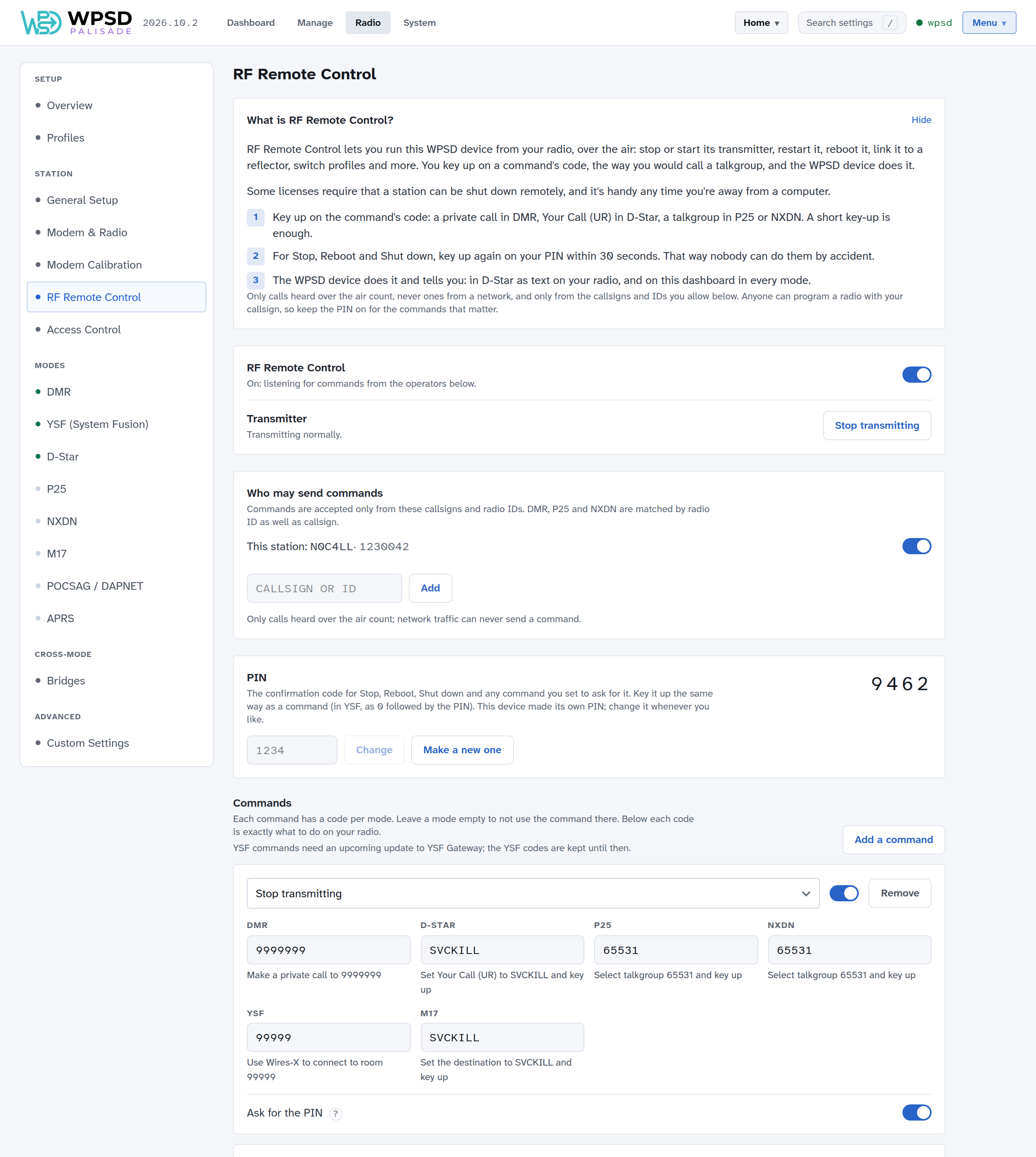
RF Remote Control lets you run your WPSD device from your radio, over the air: stop or start its transmitter, restart it, reboot or shut it down, link a reflector, switch profiles and more. You key up on a command’s code, the way you’d call a talkgroup, and the WPSD device does it.
Some licenses require that a station can be shut down remotely, and it’s handy any time you’re away from a computer. It’s on Radio > RF Remote Control, and it’s the same in every profile.
Sending a command
Key up on the command’s code. A short key-up is enough:
Mode
What to do
DMR
Make a private call to the code
D-Star
Set Your Call (UR) to the code and key up
P25, NXDN
Select the code as a talkgroup and key up
M17
Set the destination to the code and key up
The page shows, under each code, exactly what to do on your radio.
For Stop, Reboot and Shut down, key up again on your PIN within 30 seconds, the same way. That way nobody can do them by accident.
The WPSD device does it and tells you: in D-Star as text on your radio, and on the dashboard in every mode.
Note
YSF commands (connecting to a Wires-X room) need an update to YSF Gateway that’s still to come. The YSF codes are kept until then.
The commands you start with
Command |
DMR |
D-Star |
P25, NXDN |
M17 |
PIN |
|---|---|---|---|---|---|
Stop transmitting |
9999999 |
|
65531 |
|
Yes |
Restart the radio programs |
9999998 |
|
65532 |
|
|
Reboot |
9999997 |
|
65533 |
|
Yes |
Shut down |
9999996 |
|
65534 |
|
Yes |
Start transmitting |
9999995 |
|
65530 |
|
Stop transmitting puts the WPSD device in listen-only: it transmits nothing and its networks are off, but it still hears your radio, so Start transmitting (from the radio, or the button on the page) brings it back.
Add a command to add more. Choose what it does:
Transmitter: stop or start transmitting, restart the radio programs.
Modes: pause or resume a mode.
Links: link a mode to a reflector or talkgroup, unlink a mode, turn a DMR network on or off.
Profiles: switch to a profile. One call changes everything a profile holds.
System: reboot, shut down, update host files, reconnect Wi-Fi.
Paging: send a page.
Tell me: the IP address, the Wi-Fi network, the uptime, or the links.
Then give it a code in each mode you want to use it from (leave a mode empty to not use it there), and choose whether it asks for the PIN. Each command has its own on/off switch. Save when you’re done.
The page checks codes as you type: a code used twice, or one that’s a real talkgroup or reflector, or one the gateway itself acts on.
Who may send commands
Commands are accepted only from the callsigns and radio IDs under Who may send commands: your own station, and any you add. DMR, P25 and NXDN calls are matched by radio ID as well as callsign.
Only calls heard over the air count. A call that comes from a network can never send a command.
The PIN
Your WPSD device made its own 4-digit PIN when it was first set up; it’s shown on the page. Change it, or Make a new one. It guards Stop, Reboot and Shut down, and any command you set to ask for it. In YSF, the PIN is keyed as 0 followed by the PIN.
Warning
Anyone can program a radio with your callsign and ID. Keep the PIN on for the commands that matter.
Try it, the cheat card, and activity
Try it shows what a call would do, without doing anything: choose the mode, who calls, and the code they key up.
Cheat card is a summary of your station’s commands to print and keep with your radio, with or without the PIN.
Activity lists the commands heard: done, failed, waiting for the PIN, or refused, and why.
To stop treating any call as a command, turn RF Remote Control off at the top.
From WPSD (legacy)
When you restore a WPSD (legacy) backup (see Backup and Restore), its remote control settings come with it: whether it was on, its keeper callsign (as a station allowed to send commands), and its codes.