DMR
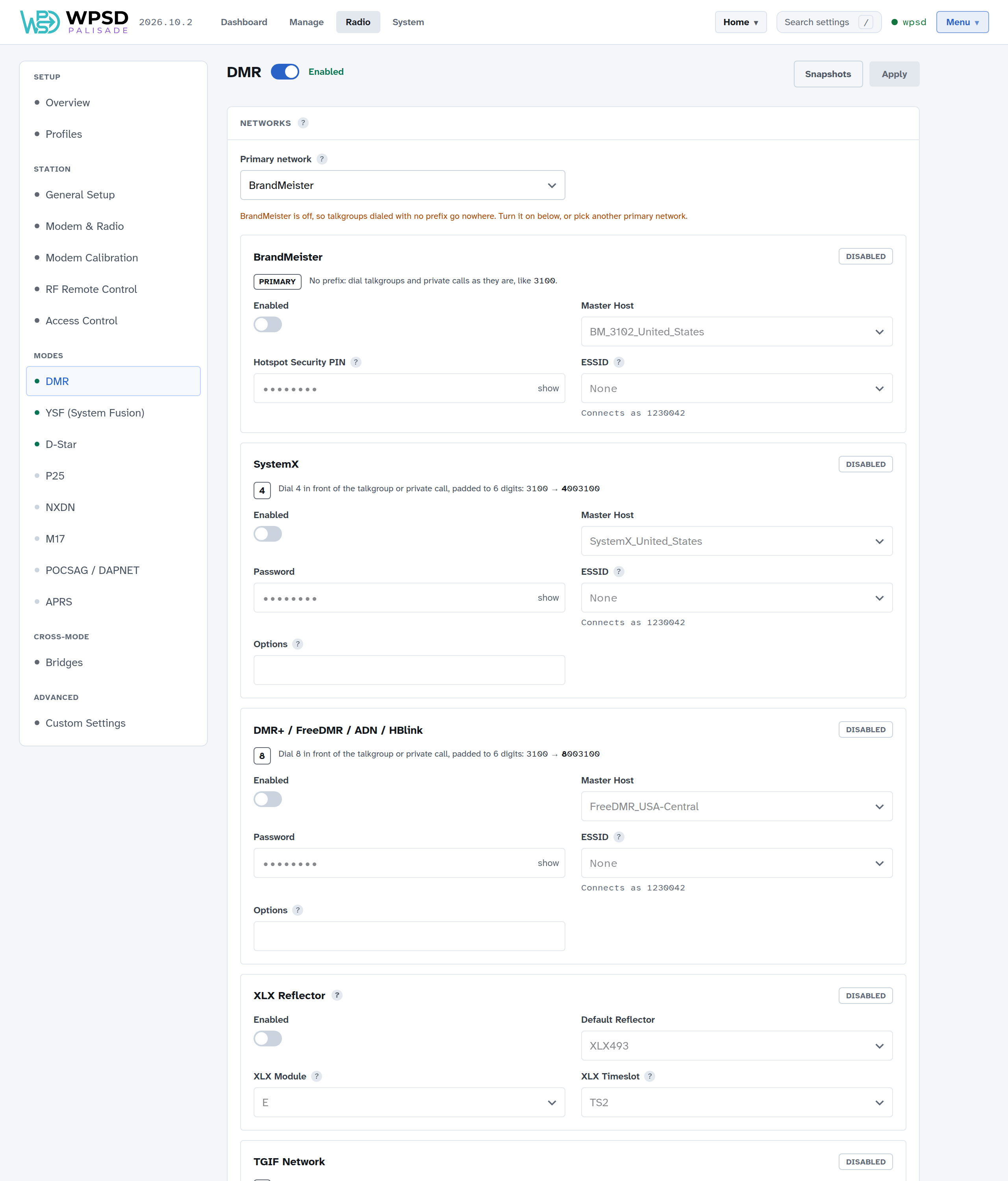
DMR settings are on Radio > DMR. Turn DMR on with the switch next to the page’s title, make your changes, then choose Apply at the top right (see Radio Settings).
You need a DMR ID, set in Station (or Guided Setup).
Networks
Your WPSD device can connect to several DMR networks at once: BrandMeister, SystemX, DMR+ / FreeDMR / ADN / HBlink, TGIF, an XLX reflector, and one Custom Network of your own. Turn on the ones you use, and for each choose:
Master Host: the network’s server you connect to (type to search the list). Choose one near you.
Password, or for BrandMeister the Hotspot Security PIN you set on your BrandMeister SelfCare page.
Options (SystemX, DMR+ / FreeDMR / ADN / HBlink, and the Custom Network): settings the master reads when you log in, such as the talkgroups to link at startup (
StartRef=4000;TS1_1=31665;TS2_1=3100). Leave it blank unless your master documents some.ESSID: two digits added to your DMR ID on that network, so it can tell your devices apart; see DMR networks and talkgroup prefixes. Connects as shows the ID it will use.
Primary network: talkgroups and private calls you dial with no prefix go to the primary network. Every other network has its own prefix digit, shown on its card (for example Dial 4 in front of the talkgroup … 3100 → 4003100 for SystemX). That way one codeplug reaches every network. When you change the primary network and apply, the WPSD device’s talkgroup rules are rewritten to match. DMR networks and talkgroup prefixes explains prefixes in detail.
XLX Reflector: choose the reflector, its module (the room you talk in; stations on other modules of the same reflector can’t hear you) and the timeslot XLX uses. A simplex hotspot carries timeslot 2 only, so XLX stays there.
Custom Network: a sixth network for a master that isn’t in the lists, such as a private HBlink or FreeDMR server: its name, address, port, password, ESSID and, only if its operator documents them, Options.
Your masters and XLX reflectors: add a server the lists don’t have, such as a club master or a test reflector. It then shows first in every list on your WPSD device. See Custom Hosts and Talkgroup Names.
Timeslots
A duplex hotspot carries both DMR timeslots; a simplex hotspot carries timeslot 2 only. Guided Setup sets these from your modem; change them only if you know your hardware needs something different.
Radio Behavior
Color Code: must match your radio’s channel (1 is common for hotspots).
Private Node (self only): only your own DMR ID can use the WPSD device over the air. On by default; some licenses require it, and it prevents network loops.
Embedded LC Only: sends only the caller and talkgroup inside each voice frame, leaving out the caller’s name details (Talker Alias) and GPS position some radios add. On by default, which avoids garbled caller text on many radios.
Dump Talker Alias Data: writes the Talker Alias and GPS data of received calls to the log, for troubleshooting.
Staying in DMR
While your WPSD device is busy with a DMR call it ignores other modes. After you transmit and After a network call say how long it keeps listening for DMR after a call ends, so replies reach you before another mode takes over. 20 seconds is a good start.
Voice announcements
Spoken messages from the gateway about what it’s linked to. Turn them off for a quiet hotspot, or choose their language.
APRS
Your DMR gateway can send your position and description to APRS-IS; see APRS and GPS.
Cross-mode bridges
Bridges let you talk from DMR to YSF or NXDN, and the other way round. They’re on Radio > Bridges; see Cross-Mode. A bridge that holds DMR off (YSF → DMR, NXDN → DMR) says so on this page, with a link to it.
Changing talkgroups and links
Static and dynamic talkgroups on BrandMeister, TGIF and SystemX, and switching networks off for now, are in Manage.