System
System in the top bar holds everything about the device itself, as opposed to your radio setup: its network, security, logs, displays and upkeep. Settings here are the same for every profile; switching profiles never changes them.
Only you, logged in, see the System pages.
Settings without a Save button take effect as soon as you change them. A switch or choice shows a turning knob while its change is applied, and a message in the corner says when it’s done, or why it couldn’t be; a change that fails goes back to how it was.
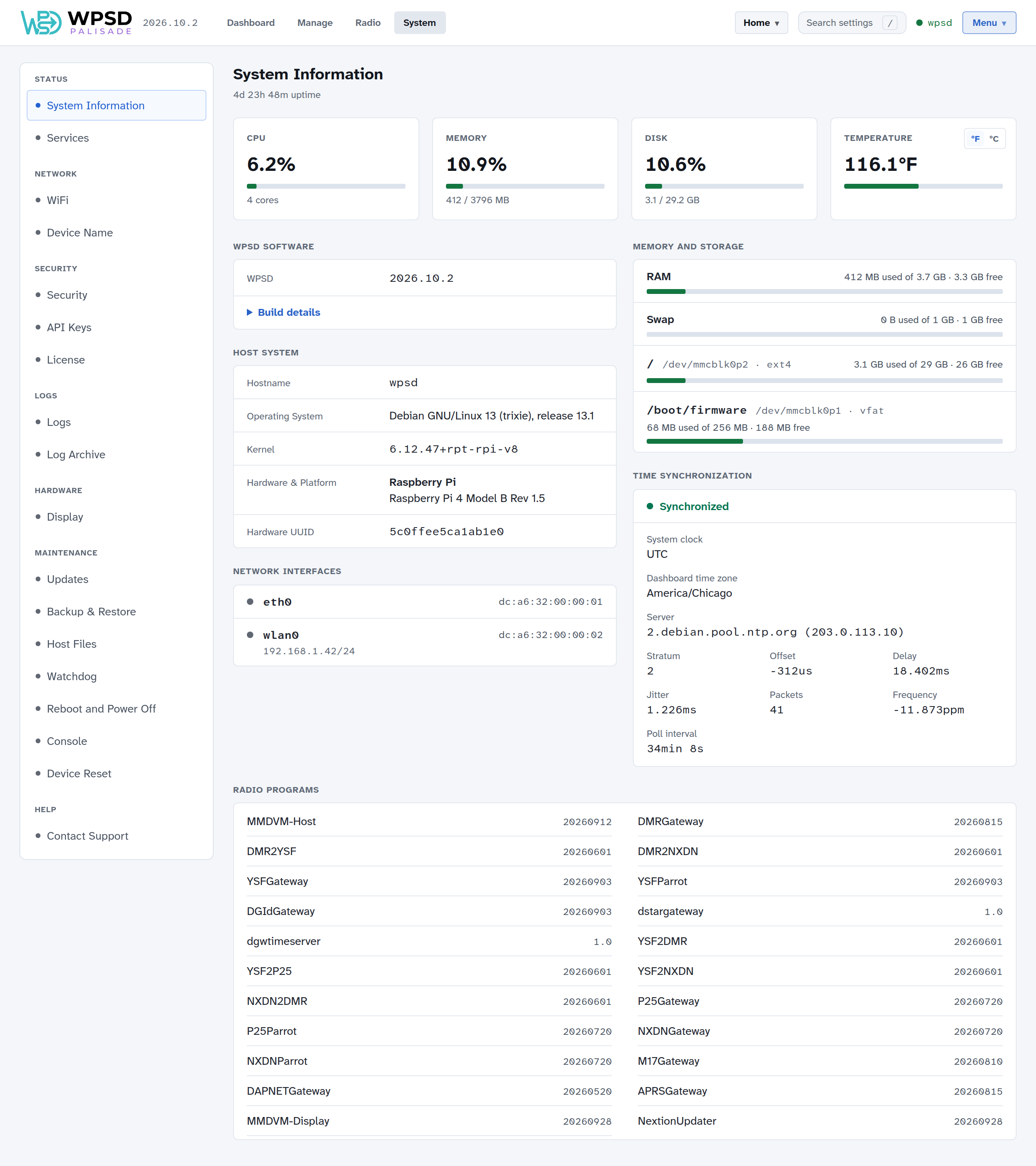
The menu on the left groups the pages:
Group |
Pages |
|---|---|
Status |
System Information: the hardware, operating system, memory, storage, network interfaces and time synchronization at a glance. Services: the programs WPSD runs (Services and Watchdog). |
Network |
WiFi and Device Name (Wi-Fi and Device Name) |
Security |
Security and API Keys (Security and Keys), License (License) |
Logs |
Logs and Log Archive (Logs) |
Hardware |
Display (Displays) |
Maintenance |
Updates (Updates), Backup & Restore (Backup and Restore), Host Files (Host Files), Watchdog (Services and Watchdog), Reboot and Power Off (Restart and Shut Down), Console (Console) and Device Reset (Device Reset) |
Help |
Contact Support (Contact Support) |
System Information
The four cards at the top show how busy the device is: CPU, memory, disk and temperature (choose °F or °C on the card). Below them:
WPSD Software: the release of WPSD Palisade the device runs, the same number as in the top bar and on Updates. Base system appears below it when a WPSD-only update has put WPSD ahead of the operating system it runs on; the next full release brings them level. Build details lists the commits and build times and the image the card was first written from; Copy build details puts them on the clipboard for a bug report. A Development build chip marks a build that isn’t a release.
Host System: the hostname, operating system, kernel, the board, and its hardware UUID.
Network Interfaces: each interface, whether it’s up, and its address.
Memory and Storage: RAM, swap, and each partition of the SD card.
Time Synchronization: whether the clock is synchronized over the network, and to which server. Most digital voice networks turn away a device whose clock is wrong, so check this first if networks won’t connect after the WPSD device has been off (see Common Symptoms).
Radio Programs: the versions of the radio programs installed.