Cross-Mode
Cross-mode bridges let a radio in one mode talk on another mode’s network: a DMR radio on System Fusion rooms, or a System Fusion radio on DMR talkgroups.
The bridges
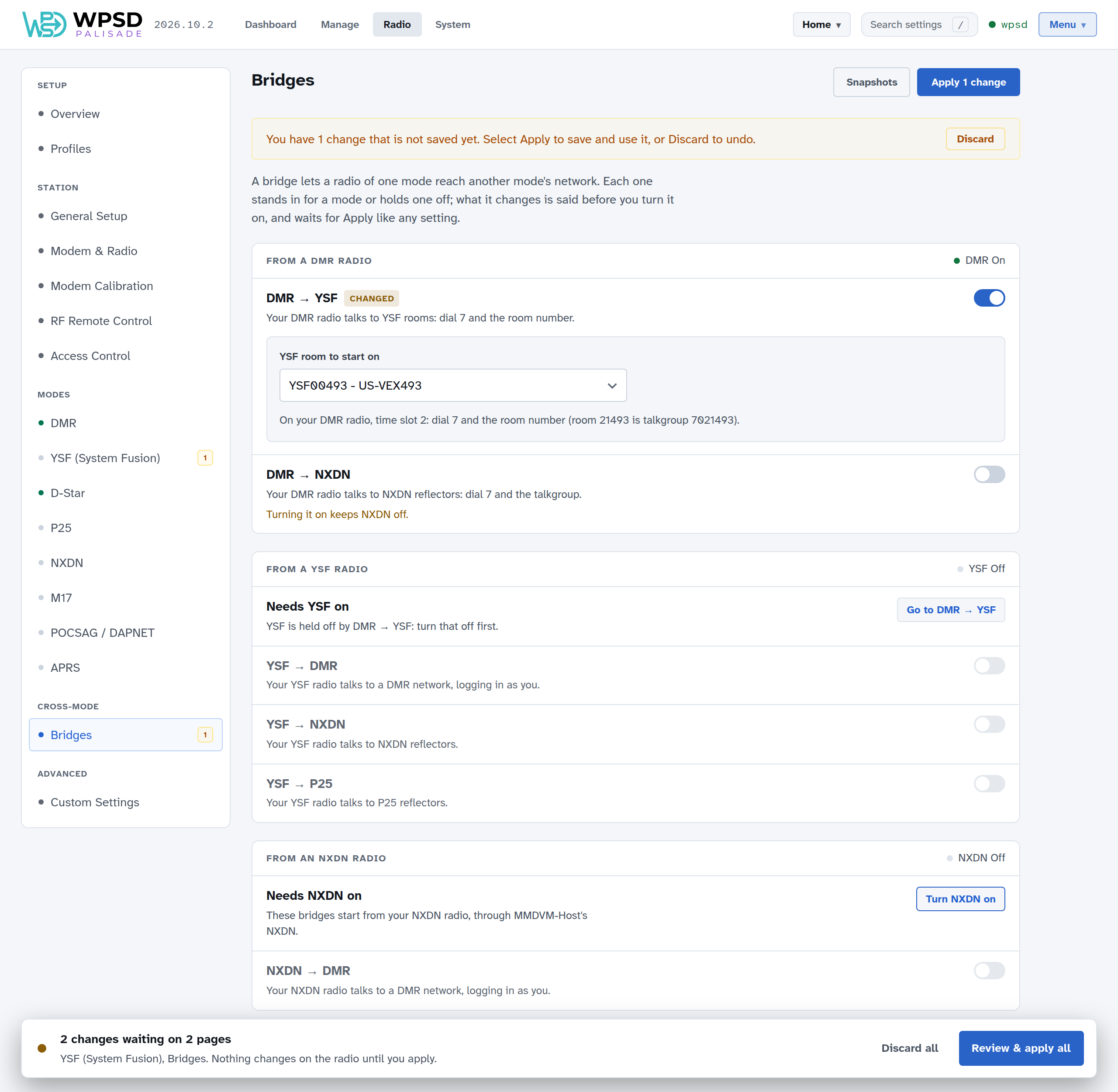
All six are on one page, Radio > Bridges, grouped by the radio you hold.
Bridge |
Needs on |
Holds off |
Its settings |
|---|---|---|---|
DMR → YSF |
DMR |
YSF |
the YSF room to start on |
DMR → NXDN |
DMR |
NXDN |
the NXDN reflectors to link |
YSF → DMR |
YSF |
DMR |
DMR network, master, password, startup talkgroup, ESSID |
YSF → NXDN |
YSF |
NXDN |
the NXDN talkgroup to start on |
YSF → P25 |
YSF |
P25 |
the P25 talkgroup to start on |
NXDN → DMR |
NXDN |
DMR |
DMR network, master, password, startup talkgroup, ESSID, and the NXDN talkgroup your radio uses |
A bridge stands in for a mode, so that mode is off while the bridge is on. Some bridges can’t run together, and the YSF bridges can’t run alongside DG-ID routing (see YSF). You don’t have to remember any of this: the page works it out as you click.
Before you turn a bridge on, it says what that will change: Turning it on turns off YSF, or keeps P25 off for a mode that’s off already.
When you turn it on, its settings open under its switch, and what it changes elsewhere waits with it for Apply. The review lists each of those changes with the reason.
A mode a bridge holds off says so on its own page (YSF is off while DMR → YSF is on), with a link to the bridge; its switch stays off until the bridge is.
Turning a bridge off gives back the mode it held off, if that mode was on before.
Turning a mode off turns off the bridges that start from it.
A group whose mode is off says so, with a button to turn that mode on.
The same rules hold however settings change: a profile switch, a restore or a backup from WPSD (legacy) can’t leave a combination that can’t work. The dashboard’s Modes & Networks panel shows a mode a bridge carries as on, via the bridge.
YSF → DMR and NXDN → DMR
These two log into a DMR network themselves, as you, so they have their own network, master, password (for BrandMeister, your Hotspot Security PIN) and startup talkgroup. MMDVM-Host’s DMR is off while either is on, so it’s always clear which way DMR goes.
If both are on, on the same network, give one of them its own ESSID (see DMR networks): the network would otherwise drop one, as it would any two connections with the same ID. The page says so, and Apply waits until they differ.
DMR → YSF
System Fusion, and Wires-X in particular, are Yaesu’s own; DMR → YSF lets a DMR radio reach the open parts of it: YSF reflectors and FCS rooms.
Both DMR bridges are reached with prefix 7 on timeslot 2: dial 7 and the YSF reflector’s number, padded to six digits. Radio > DMR shows an example under the bridge’s switch.
Talk on a reflector: for YSF00013 (GB-CQ-WORLD), use talkgroup
7000013.Link a reflector: key up briefly on its talkgroup (
70xxxxx, its number padded with zeros).Unlink: key up briefly on talkgroup
7000000. It can take a couple of tries.
There’s no spoken confirmation when you link or unlink from the radio: watch the dashboard, or link from Manage YSF / FCS instead, which is easier. Choose None as YSF’s startup reflector if you’d rather link only when you want to.
Important
YSF reflectors are numbered consistently, so they map cleanly onto DMR talkgroups. FCS rooms don’t: the talkgroup that reaches one can change whenever the room list changes. To use an FCS room, link it from Manage, then watch the dashboard for someone talking on it to see which talkgroup it arrives on.
DMR → NXDN
Like DMR → YSF: dial 7 and the NXDN talkgroup, padded to six digits, on timeslot 2. NXDN talkgroup 65000 is 7065000.